Four in a Row (FourInARow)
A comprehensive architecture, layout, and modular design guide for the classic Connect Four game implementation built with C++17, the Dustbin Games Framework (DustbinFW), and the Irrlicht 3D Engine.
01 Directory & File Layout
The project is organized into shared game commands and state machines within _source/GameClasses/, distinct application entry points (FourInARow and FourInARow_Shader), code-generated message interfaces, and build artifacts:
project/
├── CMakeLists.txt                               # CMake build specification for both apps (generated)
├── FourInARow.json                              # Central project, message & release configuration file
├── readme.md                                    # Root architecture markdown documentation
├── build/                                       # Build artifacts, solution files, and compiled binaries
│   ├── Release/                                 # FourInARow.exe, FourInARow_Shader.exe, libraries
│   └── Debug/                                   # Debug binaries and symbols
└── _source/                                     # C++ source tree
    ├── GameClasses/                             # Shared gameplay logic, UI, commands, and generated code
    │   ├── MainFunction.h / .cpp                # Common startup routine shared across app targets
    │   ├── CMenuMain.h / .cpp                   # Main menu command & GUI orchestrator
    │   ├── CCommandGameLogic.h / .cpp           # Authoritative rules engine & 7x6 board logic
    │   ├── CCommandGameScene.h / .cpp           # 3D board scene, animations, audio & HUD
    │   ├── CCommandUserInput.h / .cpp           # Human player input via mouse raycasting
    │   ├── CCommandAIInput.h / .cpp             # Minimax AI player with difficulty settings
    │   ├── CCommandRecorder.h / .cpp            # Match recorder serializing events to XML
    │   ├── CCommandReplay.h / .cpp              # Match replay player reading XML recordings
    │   ├── CCommandStartGame.h / .cpp           # Transient game start broadcaster
    │   ├── CCommandStartNet.h / .cpp            # LAN discovery server broadcaster
    │   ├── CCommandGameServer.h / .cpp          # ENet server command forwarding messages
    │   ├── CCommandDiscoverClient.h / .cpp      # LAN server discovery client UI
    │   ├── CCommandGameClient.h / .cpp          # ENet client command bridging network messages
    │   └── generated/                           # Code-generated messages and interfaces
    │       ├── CMessages.h / .cpp               # Concrete message class implementations
    │       ├── CMsgFactory.h / .cpp             # Message factory for dynamic instantiation
    │       ├── IGameLogic.h / .cpp              # Interface for the game logic command
    │       ├── IGameScene.h / .cpp              # Interface for the game scene command
    │       ├── IUserInput.h / .cpp              # Interface for human input commands
    │       ├── IAiInput.h / .cpp                # Interface for AI input commands
    │       └── IStartGame.h / .cpp              # Interface for game starter commands
    ├── FourInARow/                              # Target 1: Standard Application
    │   ├── FourInARow.cpp                       # Entry point (links render_default)
    │   └── CInitModules.h / .cpp                # Module registration (render_default)
    └── FourInARow_Shader/                       # Target 2: Shader / Shadow-Mapping Application
        ├── FourInARow_Shader.cpp                # Entry point (links render_aishader)
        └── CInitModules.h / .cpp                # Module registration (render_aishader)
External Workspace Assets & Directories
data/dialogs/four_in_a_row.xml: Declarative GUI definitions for main menus, network setup, player preferences, and HUD overlay.data/scenes/four_in_a_row.xml: 3D scene graph definition containing board frame mesh, light sources, and camera anchors.data/objects/*.3ds: 3D geometries for the board frame (four_in_a_row.3ds), chip tokens (four_in_a_row_chip.3ds), and tabletop backdrop (plane.3ds).data/textures/*.png: Surface diffuse maps for chips (red, yellow, blue, green), wood table, and branding logos.data/sounds/*.ogg: SFML audio assets for button hovers, button presses, token collision hits, and rolling sounds.data/l10n/*.txt: UTF-16 / Unicode key-value translation dictionaries (e.g.german.txt) for GUI labels, buttons, and in-game announcements.data/shaders_ai/: Custom GLSL vertex and fragment shaders for Gouraud shading, depth rendering, and cascaded shadow maps used byFourInARow_Shader.release/: Target folder populated by release packaging scripts with standalone executables, asset packages, and module licenses.
02 Multi-Application Architecture
The project demonstrates the pluggable module system of the Dustbin Games Framework. By maintaining all game controllers, AI, networking, and message handlers in _source/GameClasses/, the build system can output multiple application executables that share 100% of the game rules while swapping subsystem modules:
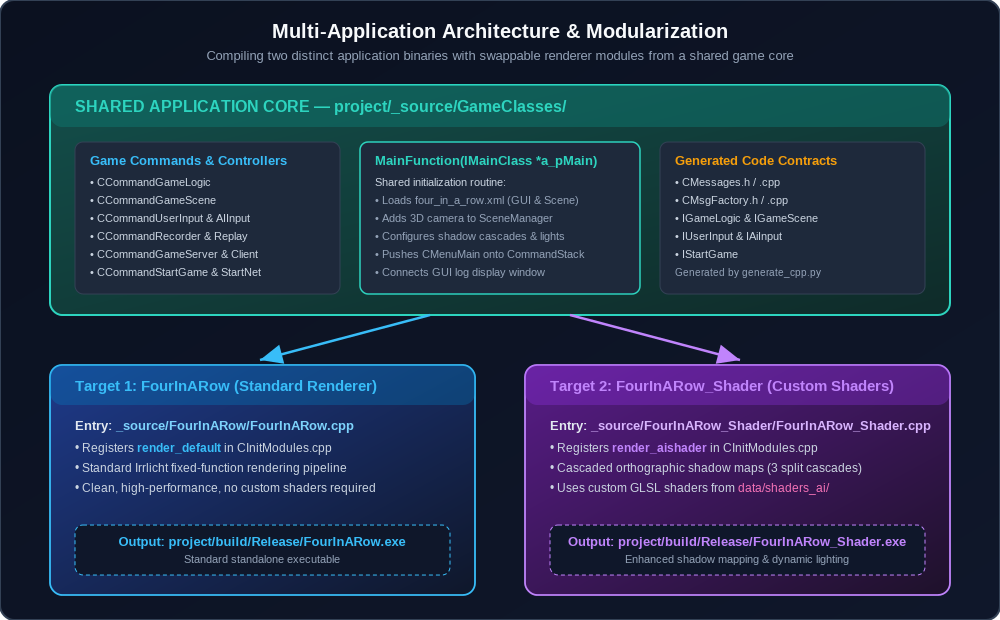
| Feature / Aspect | FourInARow |
FourInARow_Shader |
|---|---|---|
| Target Executable | FourInARow.exe |
FourInARow_Shader.exe |
| Entry Point | _source/FourInARow/FourInARow.cpp |
_source/FourInARow_Shader/FourInARow_Shader.cpp |
| Renderer Module | render_default |
render_aishader |
| Graphics Features | Standard Irrlicht fixed-function pipeline | Cascaded orthographic shadow mapping, custom Gouraud shaders, depth pre-pass |
| Shader Dependencies | None (Standard OpenGL pipeline) | Custom GLSL shaders in data/shaders_ai/ |
| Shared Game Code | 100% shared via _source/GameClasses/ |
100% shared via _source/GameClasses/ |
Shared Entry Pattern: MainFunction
Both application entry points (FourInARow.cpp and FourInARow_Shader.cpp) consist of a clean, lightweight wrapper:
int main(void) {
  dustbin::data::IDataHub::setApplicationName(_APPLICATION);
  dustbin::data::IDataHub::setProjectName    (_PROJECTNAME);
  dustbin::data::IDataHub::setVersion        (_VERSION);

  dustbin::CMainClass l_cMain;

  // Initializes app-specific modules (render_default vs. render_aishader)
  dustbin::modules::initFrameworkModules(&l_cMain);

  // Common setup routine shared across all versions
  MainFunction(&l_cMain);

  while (l_cMain.run());
  return 0;
}
MainFunction encapsulates universal setup: instantiating the dustbin::l10n::CL10n localizer, registering translation dictionaries (data/l10n/german.txt), attaching it to IDataHub, loading GUI/scene XML, reading persisted language settings, populating the CbLanguage GUI dropdown, localizing the GUI tree, setting up the 3D scene camera, configuring orthographic shadow cascade dimensions (75.0f, 100.0f, 500.0f), orienting lights, and pushing the initial CMenuMain instance onto the command stack.
03 Core Architectural Pillars
The application is architected around three foundational pillars that eliminate tight coupling between rendering, input, AI, and game logic:
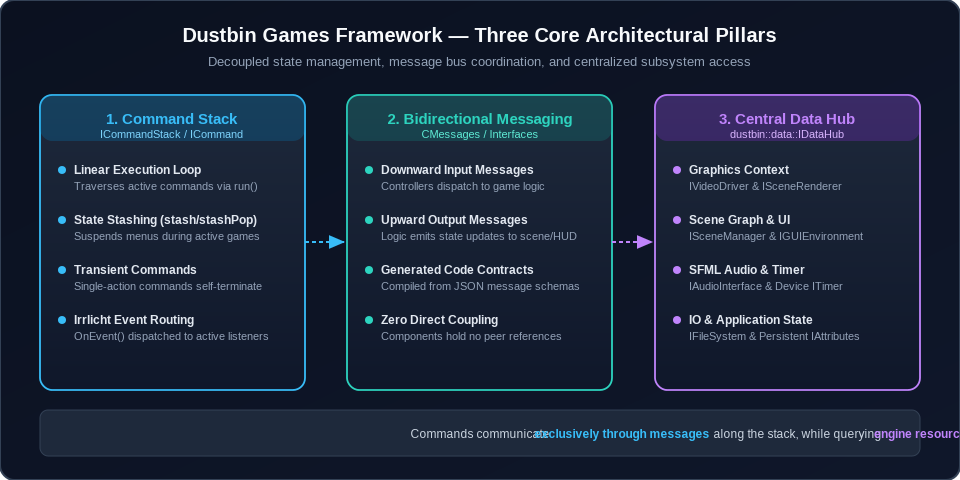
1. The Command Stack (ICommandStack)
Interactive components derive from dustbin::command::ICommand. The stack manages:
- Frame Traversal: Calls
run()on active commands every frame. - Event Handling: Distributes keyboard, mouse, and GUI events to listeners via
OnEvent(). - Stash / StashPop: Suspends the active menu stack when launching matches and restores it on match exit without reloading resources.
- Transient Commands: Executes one-shot tasks (e.g.
CCommandStartGame) and removes them once completed.
2. Bidirectional Messaging
Commands communicate without peer pointers through strongly typed messages:
- Downward Input: High-level triggers and player inputs travel downward toward the rules engine or server.
- Upward Output: Authoritative game logic and network clients broadcast state updates upward to renderers, audio, and recorders.
- Generated Contracts: Compile-time type-safety derived from
FourInARow.json.
3. Central Data Hub (IDataHub)
A unified service locator interface granting commands access to engine subsystems:
getVideoDriver()&getSceneRenderer()getSceneManager()&getGuiEnvironment()getAudioInterface()(SFML audio)getFileSystem()&getDevice()->getTimer()getSettings()(persistent XML attributes)getLocalizer()&setLocalizer()(IL10ninternationalization service)
Integrated Localization Subsystem (dustbin::l10n::IL10n)
The application implements multi-language internationalization through the framework's native dustbin::l10n::IL10n interface and its concrete implementation dustbin::l10n::CL10n:
1. Lifecycle & Registration
Instantiated in MainFunction with English as the base language:
dustbin::l10n::IL10n *l_pL10n = new dustbin::l10n::CL10n(
  a_pMain->getDataHub()->getGuiEnvironment(),
  L"English"
);
l_pL10n->registerLanguage(L"German", "data/l10n/german.txt");
a_pMain->getDataHub()->setLocalizer(l_pL10n);
2. Live UI Traversal (localize)
Calling l_pL10n->localize(pRootGUIElement) walks the entire Irrlicht GUI hierarchy and replaces text in buttons, static labels, checkboxes, tabs, and window frames with translated strings from the active dictionary.
3. Dynamic Runtime Switching
In CMenuMain, GUI events from the "CbLanguage" combobox trigger instantaneous language selection:
m_pL10n->selectLanguage(p->getItem(p->getSelected()));
m_pL10n->localize(m_pGui->getRootGUIElement());
When closing, the unlocalized language key is persisted to IDataHub::getSettings() for restoration on the next startup.
4. In-Game Announcements
Commands such as CCommandGameScene receive IL10n* to format dynamic gameplay strings:
std::wstring l_sWinner = m_pL10n != nullptr
  ? m_pL10n->getLocalizedString(L"%s wins the game")
  : L"%s wins the game";
l_sText = helpers::replaceSubstr(l_sWinner, L"%s", m_mPlayers[a_Winner]);
04 Bidirectional Message Bus Hierarchy
Commands are stacked in a linear hierarchy. Input messages enter at or near the top and travel downwards to the rules engine at the bottom. Output messages generated by the rules engine travel upwards across the stack:
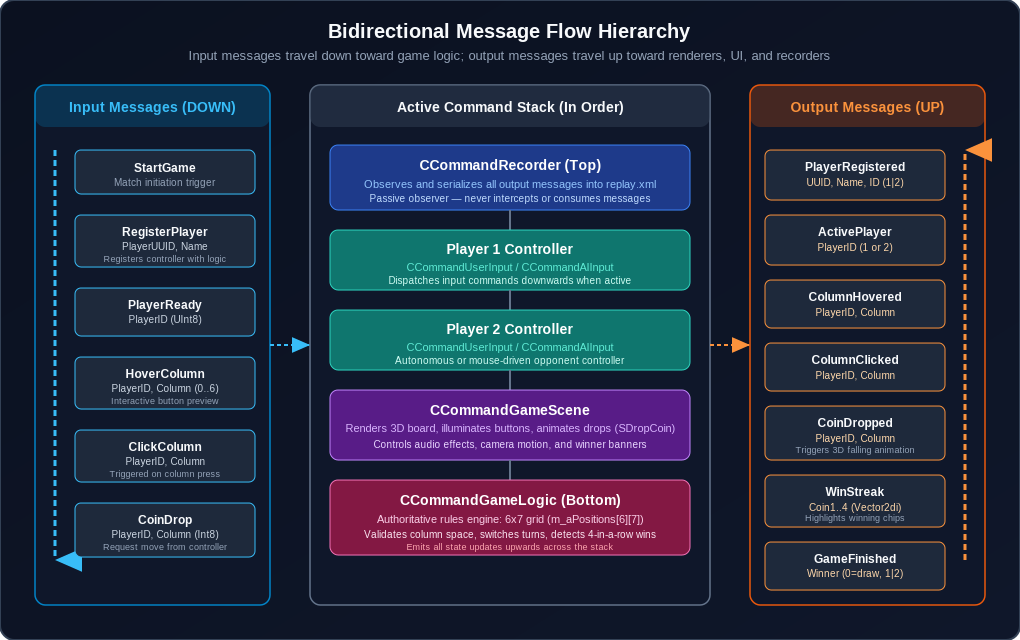
IGameLogic, IGameScene, IUserInput, IAiInput), components can be swapped dynamically. For example, a Human player (CCommandUserInput) can be swapped with a Minimax AI (CCommandAIInput) or a Network Client proxy (CCommandGameClient) without changing a single line of game logic.
05 Command Stack Topologies by Game Mode
Depending on the current state of the application, the command stack is dynamically configured into specific topologies:
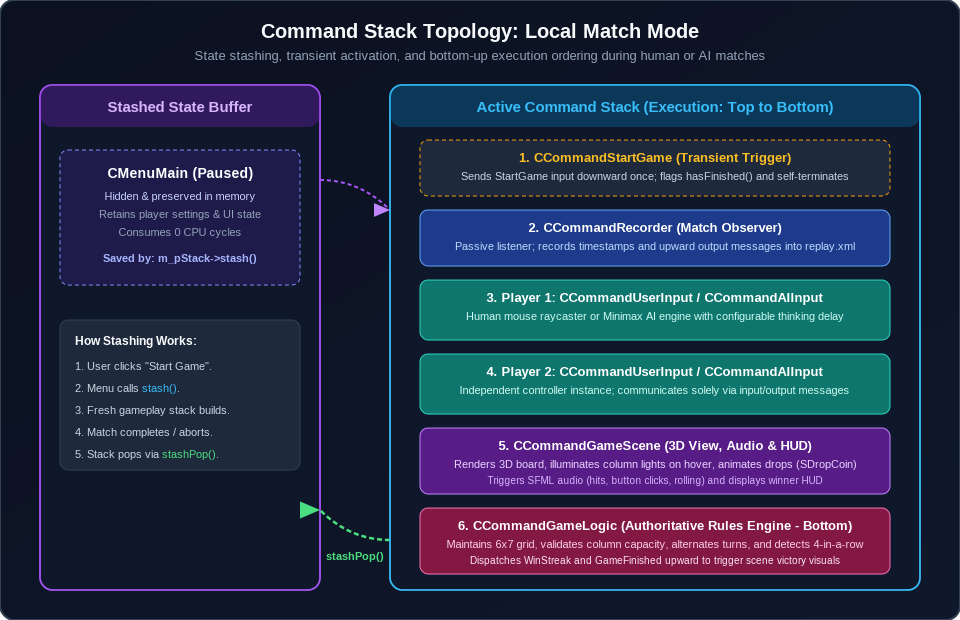
5.2 Local Game Mode (Human vs. Human, Human vs. AI, AI vs. AI)
When the user starts a game, CMenuMain calls m_pStack->stash() to preserve itself. The match stack is assembled with game logic at the bottom and controllers on top:
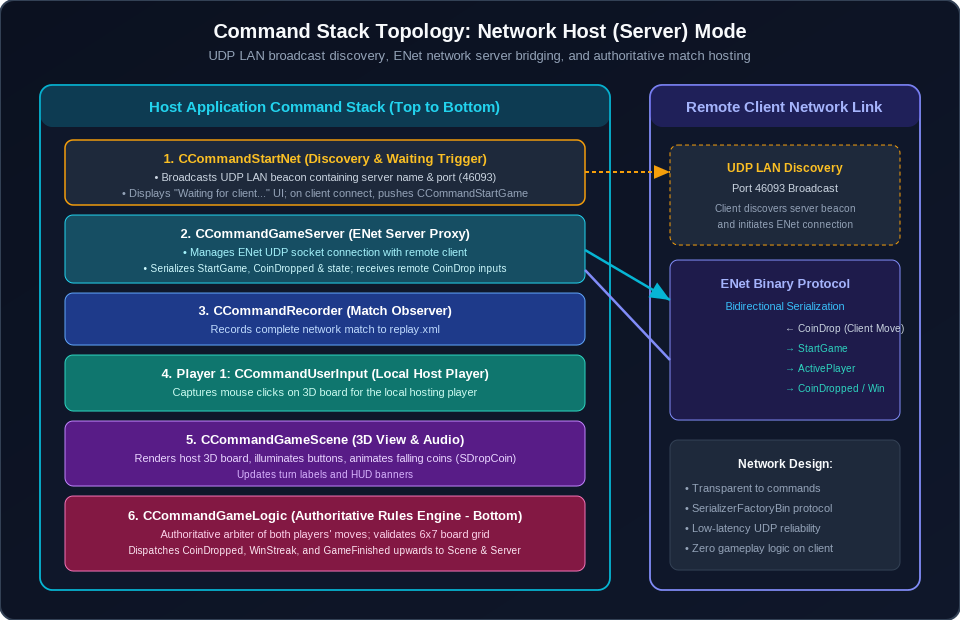
5.3 Network Game — Host (Server) Mode
Hosting builds a stack with CCommandGameServer (ENet) and CCommandStartNet (UDP Discovery Broadcaster). Once a client connects, CCommandStartNet finishes and triggers CCommandStartGame:
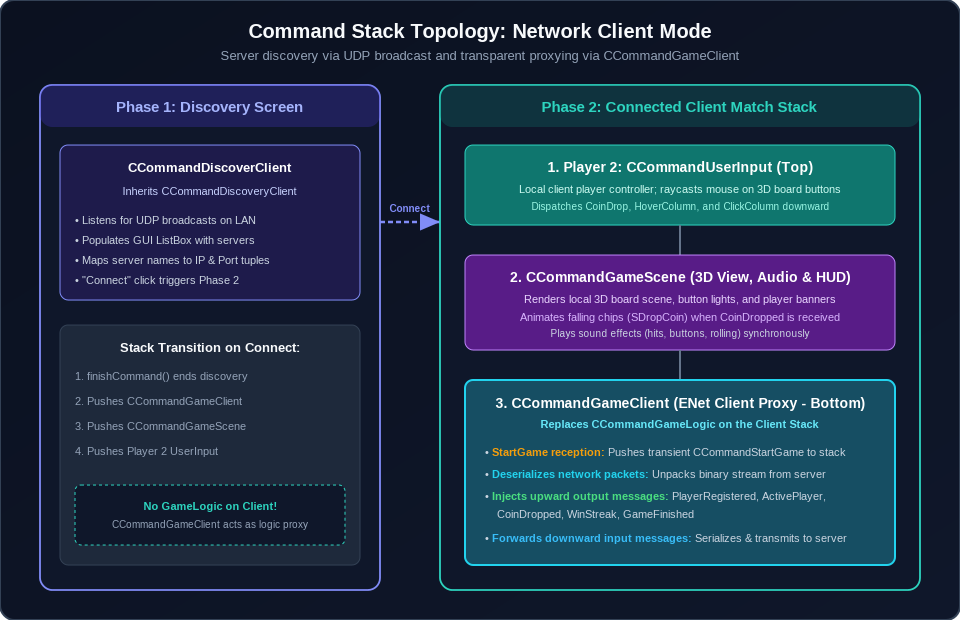
5.4 Network Game — Client Mode
The client uses CCommandDiscoverClient to discover LAN hosts. Upon connecting, CCommandGameClient is pushed at the bottom of the stack, acting as a local proxy for the remote server:
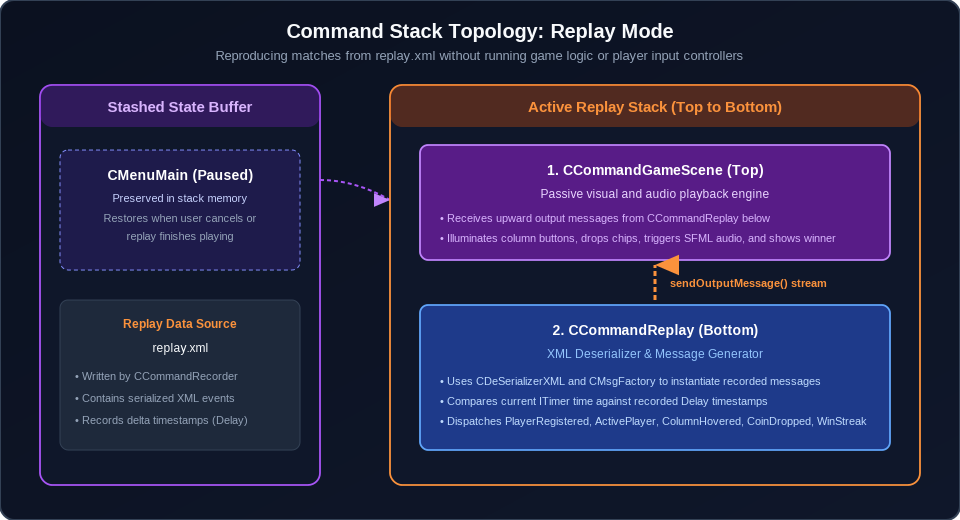
5.5 Replay Mode
Replaying a saved match requires no gameplay rules engine or input controllers. CCommandReplay reads recorded events from replay.xml, respects original delta timings, and dispatches output messages to CCommandGameScene:
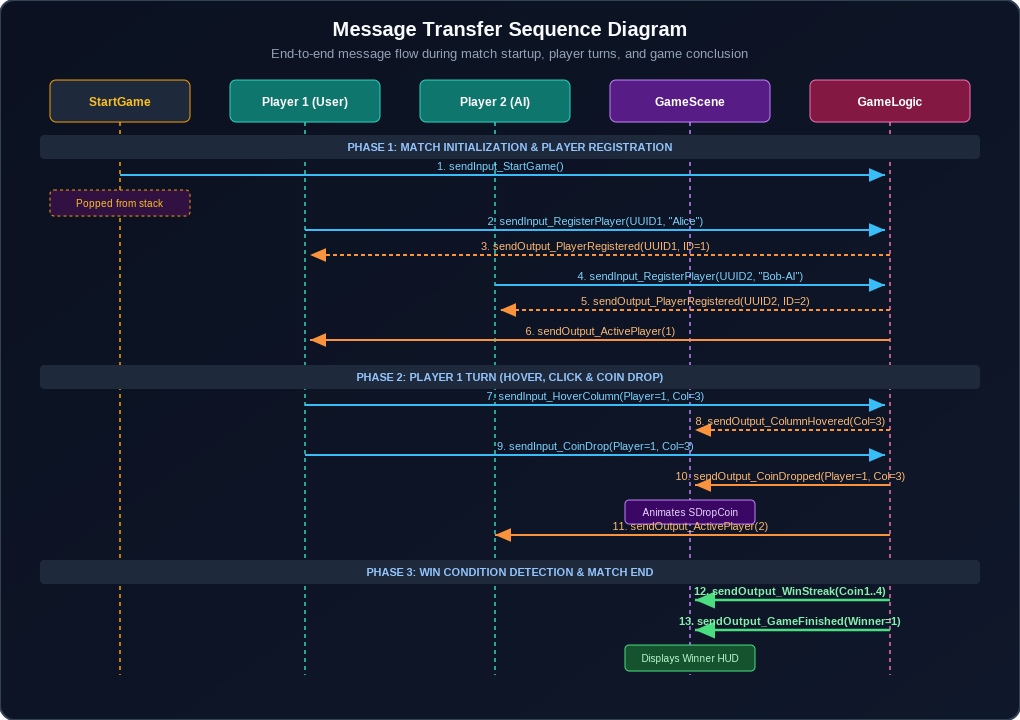
06 Message Transfer Sequence & Lifecycle
The following sequence diagram outlines the chronological flow of messages between startup, registration, active player turns, hover previews, token drops, and game finish:
07 Component Directory & Reference
7.1 Application Entry & Module Initializers
| Component | Files | Responsibilities |
|---|---|---|
| Standard App Entry | _source/FourInARow/FourInARow.cpp |
Entry point for FourInARow.exe; registers render_default and calls MainFunction. |
| Standard Modules | _source/FourInARow/CInitModules.cpp/.h |
Auto-generated module registry initializing default renderer, audio, and GUI subsystems. |
| Shader App Entry | _source/FourInARow_Shader/FourInARow_Shader.cpp |
Entry point for FourInARow_Shader.exe; registers render_aishader and calls MainFunction. |
| Shader Modules | _source/FourInARow_Shader/CInitModules.cpp/.h |
Auto-generated module registry initializing custom shader renderer and shadow mapping pipeline. |
| Shared MainFunction | _source/GameClasses/MainFunction.cpp/.h |
Initializes dustbin::l10n::CL10n, registers German translation dictionary, sets localizer on IDataHub, loads scene/GUI XML, restores persisted language, configures camera, lights, shadow cascade dimensions, and pushes CMenuMain. |
7.2 Core Game Classes (_source/GameClasses/)
| Class | Base Class / Interface | Responsibilities |
|---|---|---|
CMenuMain |
ICommand |
Manages main menu GUI, player settings, Human/AI toggles, difficulty selection, language switching (CbLanguage), dynamic GUI re-localization, settings persistence, and stack stashing. |
CCommandGameLogic |
IGameLogic |
Authoritative 6x7 board grid (m_aPositions[6][7]), move validation, turn switching, and 4-in-a-row victory detection. |
CCommandGameScene |
IGameScene |
Renders 3D board scene, button illumination, falling coin animation (SDropCoin), winning streak highlights, audio, and localized in-game HUD banners via IL10n. |
CCommandUserInput |
IUserInput |
Human player controller; casts mouse ray onto 3D column buttons (m_aButtons[0..6]) and sends hover, click, and drop messages. |
CCommandAIInput |
IAiInput |
Autonomous AI with 3 difficulty levels (Easy, Medium, Hard). Uses Minimax with Alpha-Beta pruning, thinking delays, and hover previews. |
CCommandRecorder |
ICommand |
Passive observer capturing timestamps and output messages into replay.xml using CSerializerXML. |
CCommandReplay |
ICommand |
Deserializes replay.xml with CDeSerializerXML and dispatches output messages to CCommandGameScene. |
CCommandStartGame |
IStartGame |
Transient one-shot trigger command that emits StartGame downward, then self-terminates. |
CCommandStartNet |
CCommandDiscoveryServer |
Broadcasts UDP beacons on LAN, displays waiting status, and pushes CCommandStartGame when a client connects. |
CCommandGameServer |
CCommandENetServer |
ENet server command forwarding serialized input and output messages to/from connected clients over network sockets. |
CCommandDiscoverClient |
CCommandDiscoveryClient |
Listens for UDP LAN broadcasts, populates server listbox, manages connection initiation, and forwards IL10n to the game scene. |
CCommandGameClient |
CCommandENetClient |
ENet client command replacing CCommandGameLogic on the client; deserializes host packets and pushes output messages. |
7.3 Localization Subsystem (dustbin::l10n)
| Class / Interface | Header | Responsibilities |
|---|---|---|
IL10n |
dustbin/l10n/IL10n.h |
Abstract base interface for language registration, language selection, GUI element tree traversal (localize), key unlocalization, and formatted string translation (getLocalizedString). |
CL10n |
dustbin/l10n/CL10n.h |
Concrete implementation managing language dictionaries loaded from text files (e.g. data/l10n/german.txt), default locale, and Irrlicht GUI string replacement. |
08 Message Specifications & Contracts
8.1 Defined Messages
| Message Name | Direction | Payload Fields | Purpose |
|---|---|---|---|
RegisterPlayer |
Input (Down) | PlayerUUID (String), Name (String) |
Registers a controller with the game logic. |
PlayerRegistered |
Output (Up) | PlayerUUID (String), Name (String), PlayerID (UInt8) |
Notifies controller of assigned player ID (1 or 2). |
PlayerReady |
Input (Down) | PlayerID (UInt8) |
Notifies game logic that controller is ready. |
ActivePlayer |
Output (Up) | PlayerID (Int8) |
Specifies active player whose turn it is. |
HoverColumn |
Input (Down) | PlayerID (UInt8), Column (UInt8) |
Sent by controller when cursor/AI hovers a column (255 = none). |
ColumnHovered |
Output (Up) | PlayerID (UInt8), Column (UInt8) |
Broadcast by logic to illuminate column buttons in 3D scene. |
ClickColumn |
Input (Down) | PlayerID (UInt8), Column (UInt8) |
Sent by user input when column button is clicked. |
ColumnClicked |
Output (Up) | PlayerID (UInt8), Column (UInt8) |
Broadcast by logic to confirm column button press. |
CoinDrop |
Input (Down) | PlayerID (UInt8), Column (Int8) |
Request from controller to drop a coin into a column. |
CoinDropped |
Output (Up) | PlayerID (Int8), Column (UInt8) |
Authoritative confirmation; triggers 3D coin drop animation. |
WinStreak |
Output (Up) | Coin1..4 (Vector2di) |
Grid coordinates of 4 winning chips for visual highlight. |
GameFinished |
Output (Up) | Winner (Int8) |
Match result (0 = draw, 1 = Player 1, 2 = Player 2). |
StartGame |
Input (Down) | (none) | Broadcast once to start player registration and begin game. |
Delay |
Recording | timestamp (UInt32) |
Timing offset recorded into replay.xml. |
8.2 Interface Send / Receive Matrix
| Interface | Can Send (Input) | Can Send (Output) | Can Receive (Input) | Can Receive (Output) |
|---|---|---|---|---|
IGameLogic |
— | ActivePlayer, CoinDropped, GameFinished, PlayerRegistered, ColumnHovered, ColumnClicked, WinStreak | RegisterPlayer, PlayerReady, CoinDrop, StartGame, HoverColumn, ClickColumn | — |
IGameScene |
— | — | — | ActivePlayer, CoinDropped, GameFinished, ColumnHovered, ColumnClicked, PlayerRegistered, WinStreak |
IUserInput |
RegisterPlayer, PlayerReady, CoinDrop, HoverColumn, ClickColumn | — | StartGame | PlayerRegistered, ActivePlayer |
IAiInput |
RegisterPlayer, PlayerReady, CoinDrop, HoverColumn, ClickColumn | — | StartGame | PlayerRegistered, ActivePlayer, CoinDropped |
IStartGame |
StartGame | — | — | — |
09 Build Pipeline & Code Generation Reference
Building the project follows a multi-stage process where code generation precedes CMake project configuration:
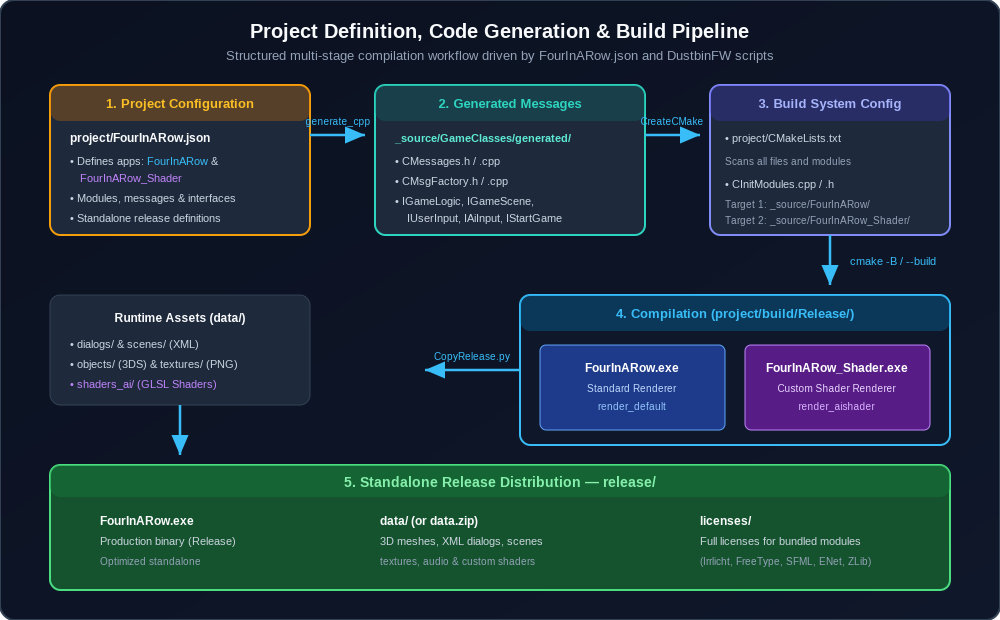
generate_cpp.py) must be executed before generating CMakeLists.txt (CreateCMakeLists.py), so that generated files in _source/GameClasses/generated/ are discovered during the project file scan.
Step-by-Step PowerShell Build Commands
# 1. Set the framework directory path
$FRAMEWORK_DIR = "D:\MyStuff\projects\DustbinFramework_git"

# 2. Generate C++ messages and interfaces from project/FourInARow.json
python "$FRAMEWORK_DIR\scripts\Messages\generate_cpp.py" "project\FourInARow.json"

# 3. Generate project/CMakeLists.txt and CInitModules.cpp/.h for both apps
pushd "$FRAMEWORK_DIR\scripts\MakeCMakeWizard"
python CreateCMakeLists.py generate inputfile="D:\MyStuff\projects\Playground\FourInARow\project\FourInARow.json" frameworkfolder="$FRAMEWORK_DIR" projectfolder="D:\MyStuff\projects\Playground\FourInARow"
popd

# 4. Generate CMake build files
cmake -B project/build -S project

# 5. Build both applications (Release)
cmake --build project/build --config Release

# Or build individual targets:
cmake --build project/build --config Release --target FourInARow
cmake --build project/build --config Release --target FourInARow_Shader